Welcome to Agent Empowerment
Get set up to receive high-quality inbound insurance calls
📱 MAIN UPDATE: No More Lag time and uneven routing
✅ Calls now come directly through QueueConnect on your laptop/browser
✅ Answer calls instantly when you're "Available" in QueueConnect
- Keep QueueConnect open in your browser (Chrome recommended)
- Can also use Chrome on your smartphone with screen unlocked and open
- No phone setup required - everything happens through the browser
- Instant call connection with no lag time
🎬 REQUIRED: Watch This Setup Tutorial First
Complete Agent Setup Tutorial
Learn how to set up your phone system, QueueConnect, and start receiving calls • 10 minutes
Watch Video Tutorial🎧 Listen to Successful Call Examples
Learn from real successful calls with actual customers. These examples will help you understand tone, pacing, and effective sales techniques.
📞 Sample Call #1
📞 Sample Call #2
📞 Sample Call #3
📞 Sample Call #4
📞 Sample Call #5
📞 Sample Call #6
📞 Sample Call #7
📞 Sample Call #8
💡 Pro Tip: Listen to how agents build rapport, handle objections, and guide customers toward a decision.
These are real calls from successful agents - use them as your blueprint for success!
Initial Onboarding & System Setup
📝 What We'll Collect
- Personal and business contact information
- Licensed states for receiving calls
- Hours of operation and time zone
- Call capacity (concurrency)
⚡ Setup Process
- Complete onboarding form
- Receive invoice for system setup ($60)
- Account creation across all platforms
- Receive login credentials within 1-2 days
📧 Email #1: Welcome & Onboarding Instructions
You'll receive this email immediately after expressing interest:
Dear Shawn,
Welcome to Agent Empowerment — we're excited to help you launch your live call campaign! To begin, please complete the form below so we can configure your campaign and send your invoice.
✅ Step 1: Fill Out Your Onboarding Form
Once you submit the form:
- You'll receive an invoice for your system setup ($60 - phone system setup)
- After payment, we'll activate your setup within 1-2 business days
💰 How Billing Works
📧 Email #2: Phone & CRM Setup Instructions
After completing the form and payment, you'll receive:
Dear Shawn,
Welcome! Your live call campaign is being created, and you'll begin receiving inbound Final Expense and Life Insurance calls within the next 3-5 business days.
✅ Browser Setup Requirements
- Keep QueueConnect open in your browser (Chrome recommended)
- Can also use Chrome on your smartphone with screen unlocked and open
- No phone setup required - everything happens through the browser
- Instant call connection with no lag time
- Ensure microphone permissions are enabled for the browser
✅ QueueConnect Login Credentials
- Email: Your email
- Password:
Leads123@@ - URL: https://connect.queueleads.com/login
⚠️ AVAILABILITY STATUS MANAGEMENT - This is crucial for call flow:
• Before taking calls: Set yourself to "Available" in QueueConnect
• QueueConnect automatically knows when you're busy on a call
• If you need a break: Switch to "Not Available" to pause incoming calls
• After breaks: Switch back to "Available" for more calls
Note: Ringba login credentials will be sent in a separate email. All call recordings will be available via Ringba for quality assurance and training purposes.
The Daily Process to Start Receiving Calls
Important: Keep your browser open with QueueConnect and ensure microphone permissions are enabled to control call flow.
🚨 FIRST: Log in to QueueConnect
ALWAYS START HERE! Access QueueConnect at https://connect.queueleads.com/login
Use your provided credentials - This MUST be your first login
Verify Browser Setup
Ensure your browser is ready for calls:
- Chrome browser recommended
- Microphone permissions enabled
- QueueConnect tab stays open and active
- Can also use smartphone with Chrome (screen unlocked)
Set Status to "Available" in QueueConnect
In QueueConnect: Click the "Available" button to start receiving calls
Toggle status to "Available" to start receiving calls
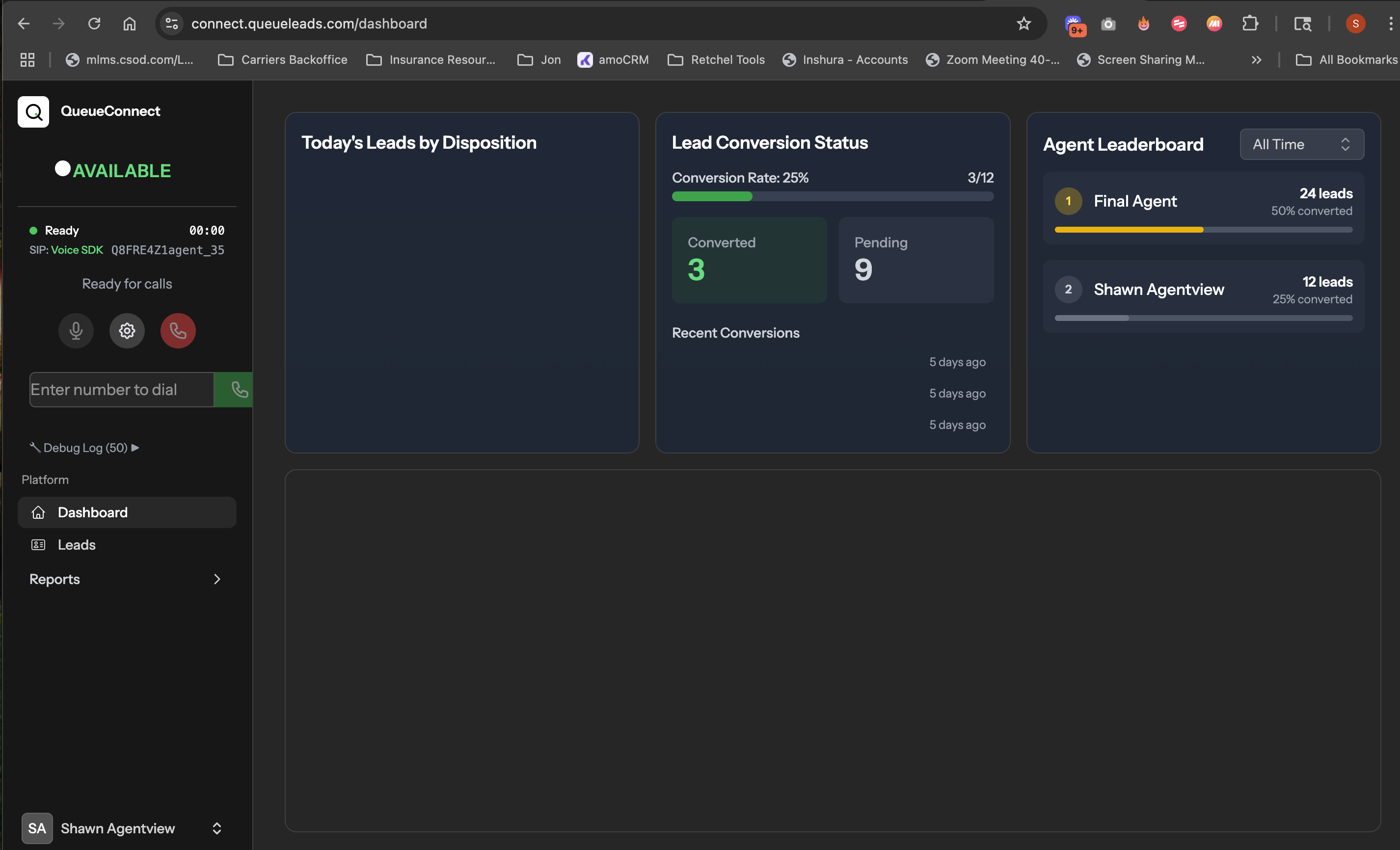
Click the "Available" button in QueueConnect to start receiving calls
⚠️ AVAILABILITY STATUS MANAGEMENT
This is crucial for call flow:
Set yourself to "Available" in QueueConnect
No need to manually switch status during calls
Switch to "Not Available" to pause calls, then back to "Available" when ready
What to Expect & Performance Tracking
📊 Performance Expectations
🎯 Track Performance with Ringba
Call Details
Timestamps, caller ID, duration, and connection status
Call Recordings
Listen to or download for quality assurance
Transparent Billing
Real-time tracking of billable calls and earnings
These are real consumers calling from our high-converting online ads.
You're not chasing cold leads — you're responding to demand.
📋 Agent Script Resources
Use these proven scripts as your guide during calls. Reference them alongside the sample call recordings above.
FEX Script Version OC24
Complete call opening and qualification script with step-by-step conversation flow
📄 View FEX ScriptPresentation Script & Framework
Comprehensive sales methodology covering Trust, Need, and Urgency with detailed qualification questions
📄 View Presentation ScriptAdvanced Agent Script
Additional script resource with advanced techniques and conversation strategies for experienced agents
📄 View Advanced Script💡 How to Use These Scripts: These are frameworks, not word-for-word requirements. Adapt the language to your natural speaking style while maintaining the structure and key points.
Listen to the sample calls above to hear how successful agents use these scripts in real conversations!